
Forms for WhatsApp, SMS and web
Collect registrations, applications and survey answers as a guided conversation or a web form.
One question, asked as a web field, a WhatsApp message or an SMS reply.
Illustrative question.
One process, several ways in
Some people prefer a familiar web form. Others need help one question at a time. Guide them through the questions in manageable steps, then use their answers in the service you are delivering.
Example: route registrations by district.
Discuss your formWeb
A browser-based form for customers who prefer to see and complete fields on a page.
Question 3 of 6: which district do you live in?
Kweneng
Complete the form as a guided WhatsApp conversation.
Q3 of 6: which district do you live in? Reply with the name, e.g. KWENENG.
KWENENG
SMS
Answer one question at a time by SMS, without a data bundle.
Illustrative workflow.
Set the questions, required answers and validation, then choose what happens next. For USSD, use a menu-driven version of the journey.
Watch a form get built
Describe what you need to collect in plain English. The questions, the rules and the wording customers see are drafted for you to check and adjust.
Use the form as a web page or a conversation.
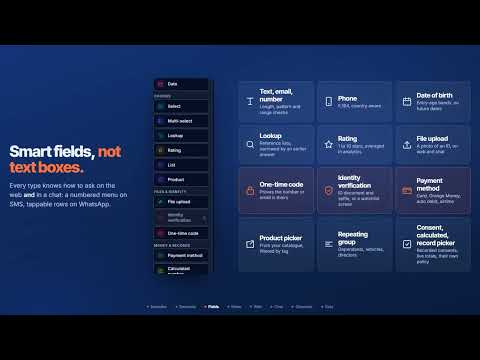
Smart fields, not text boxes · More on our channel
Where forms help
Start with a process where structured answers help your team complete the next step.

Registrations and onboarding
Register customers, capture interest or enrol people in a programme, then send a clear next step.
Surveys and feedback
Ask focused questions through a channel your audience can use. Keep responses structured so your team can review them and plan follow-up.
Service enquiries and applications
Capture the details your team needs to assess requests and take the next step.
Example: programme registration
Guide people through registration and send the next step.
Explain the programme
Say what the programme is and how the registration information will be used.
Collect registration details
Ask for the contact, location and other details needed for the programme.
Capture communication preferences
Let people choose how they’d like to hear from you.
Show or send the next step
Confirm registration and explain what happens next.
Connect answers to the next action
Use form answers to trigger confirmations, reminders or a staff handover.
Send submissions to your business systems through integrations.
Confirmation
Tell the person what happens next, on the channel they used.
Reminder
Schedule a follow-up at the right point in the journey.
Staff handover
Route submissions that need review to the right person on your team.
Your system of record
Create or update the right record in your connected system.
See it both ways
Bring a registration form or questionnaire. See how it works as a web form and a conversation.